Differentiator #4

Every Vulnerability Comes With
Its Fix. Automatically.

Checkmarx tells you what's wrong. SonarQube gives you a recommendation. AquilaX generates validated fix code specific to your codebase and opens a pull request — automatically.
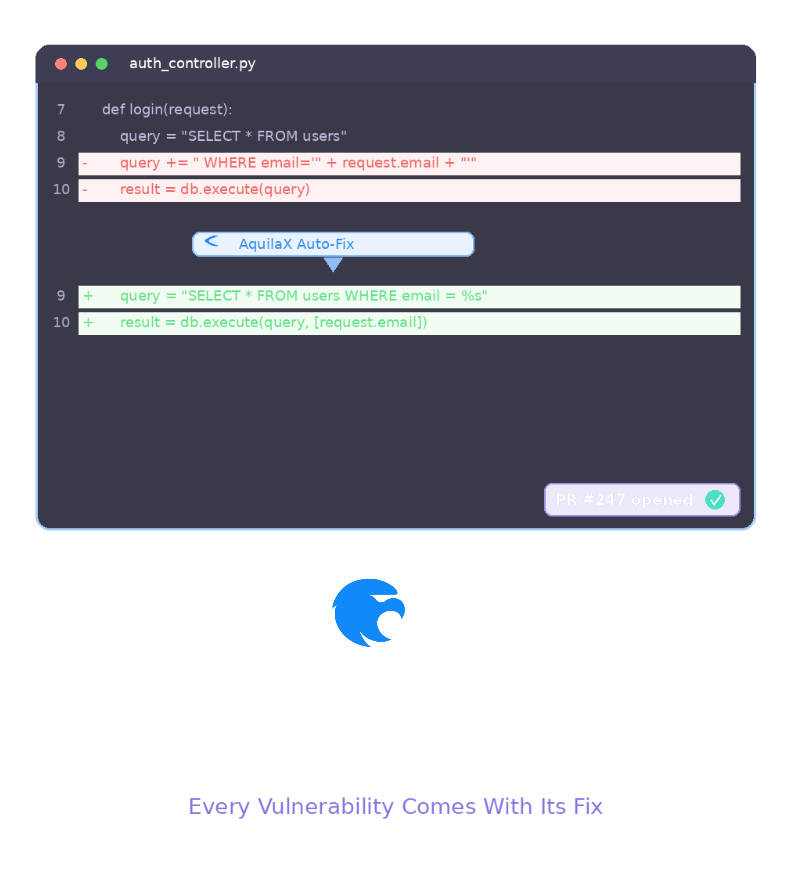
Auto-Generated Security Fix
The Difference

From Alert to Merged Fix — Without the Homework

See what you actually get from each approach when a SQL injection is detected in your codebase.

⚠️ Traditional Scanner Output (Checkmarx / SonarQube)
Finding: SQL Injection
CWE-89 · Severity: High
File: src/users/repository.js:47
 
Recommendation: Use parameterized
queries instead of string concatenation.
 
Reference: https://cwe.mitre.org/...
 
// That's it. Good luck.
✓ AquilaX Auto-Fix Output
- const q = `SELECT * FROM users
- WHERE id = ${userId}`;
- db.query(q);
+ const q = 'SELECT * FROM users
+ WHERE id = ?';
+ db.query(q, [userId]);
 
// Validated against your ORM pattern
// Fix tested — no breaking changes
✓ PR #247 opened automatically

An Alert Without a Fix Is Just More Work

The average time to fix a security finding with traditional tools vs. AquilaX.

⏳ With Checkmarx / SonarQube / Snyk

1

Receive alert with vulnerability description

2

Research the vulnerability type (CWE, OWASP)

3

Understand how it applies to your specific code

4

Write the fix yourself, adapted to your framework

5

Test it manually to ensure nothing breaks

6

Submit PR, wait for review, repeat 200x

30–90 min per finding × 200+ findings

⚡ With AquilaX

1

Receive finding with validated, ready-to-merge fix code

2

Review the auto-generated PR (it already works)

3

Merge. Done.

~2 minutes per finding

How AquilaX Auto-Remediation Works

Not generic templates. Validated fix code specific to your actual codebase, framework, and dependencies.

Step 1

Vulnerability Detected

32 parallel scanners identify a real, exploitable issue — not a false positive.

Step 2

Codebase Context Analysis

AI analyzes your framework, ORM patterns, existing sanitization, and architectural conventions.

Step 3

Fix Code Generated

Fix code is written specific to YOUR code — not generic templates that may not apply.

Step 4

Validated Automatically

The fix is validated against your codebase to ensure it doesn't break existing functionality.

Step 5

PR Opened

A pull request is opened in GitHub or GitLab automatically. Developer reviews and merges.

What Happens After Detection?

Most tools stop at "telling you". AquilaX is the only platform that fixes ALL finding types automatically.

AquilaX

Validated fix code + automatic PRs for ALL finding types — SAST, SCA, Secrets, IaC, and more.

Checkmarx

Generic recommendation text. Remediation Assist is in preview — no validation, no auto-PR.

SonarQube

AI CodeFix requires Enterprise license + external OpenAI subscription. Basic suggestions only.

Snyk

Auto-PRs for dependency version bumps only. No fix generation for custom code vulnerabilities.

Black Duck

Manual remediation guidance only. No automated fix generation or PR creation.

Semgrep

AI Assistant provides generic fix suggestions. No codebase-aware validation or auto-PR.

Security That Fixes Itself

Security Tools Should Solve Problems,
Not Create Homework.

Try AquilaX free and experience the difference between an alert and an actual fix — validated, merged, done.

Try AquilaX Free

Disclaimer: The comparisons against third-party products on this page are made by the AquilaX engineering team and represent an independent view of AquilaX's capabilities based on publicly available information, product documentation, and industry benchmarks at the time of writing. Competitor products evolve over time and their capabilities may differ from what is described here. You should conduct your own research and evaluation before making any purchasing decision.